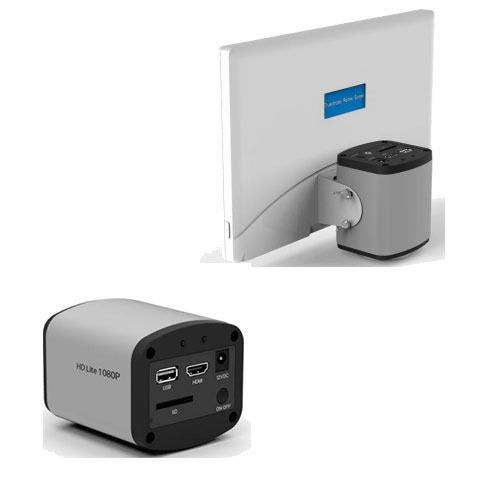
The HD Lite is an economical C mount, HDMI output camera (1080P) or a 5Mega Pixel capture camera for
stillsand 1080P avi movie capture camera to SD card mounted on board.
• NO computer required, small footprint when mounted on microscope with Retina screen.
• Very easy to use, and capture quality pictures.
• Ideal to use for discussions groups, or evaluating specimens without looking down eyepieces.
The HDLite can be connected via USB direct to the computer and run in Windows with Is Capture software.
HD Lite-RETINA This handy camera can be supplied with mounted HDMI monitor that allows you to
control the camera settings and capture stills and movies. The Retina screen is 29.5cm (11.6”) diagonal
and has a pixelresolution of 1920 x1080.
➢ Digital zoom upto 10 times
➢ Image orientation
➢ Compare live to capture images
➢ Crosshairs red or green
➢ View SD card stills and movies
➢ Use of mouse pointer on screen for items of interest.
| Category | Details |
|---|---|
| Product Overview | The HD Lite is an economical C-mount HDMI output camera (1080P) or a 5 Mega Pixel capture camera for still images and 1080P AVI movie capture to an on-board SD card. |
| Computer Requirement | No computer required. Small footprint when mounted on a microscope with Retina screen. |
| Ease of Use | Very easy to use and captures high-quality images. |
| Application | Ideal for discussion groups or evaluating specimens without looking through eyepieces. |
| USB Connectivity | Can be connected via USB directly to a computer and operated on Windows using IS Capture software. |
| HD Lite-RETINA | Can be supplied with a mounted HDMI monitor allowing full control of camera settings and capture of stills and movies. |
| Retina Screen Size | 29.5 cm (11.6”) diagonal |
| Screen Resolution | 1920 × 1080 pixels |
| Digital Zoom | Up to 10× |
| Image Orientation | Supported |
| Image Comparison | Compare live image with captured images |
| Crosshairs | Red or Green |
| SD Card Viewing | View still images and movies directly from SD card |
| Mouse Support | Mouse pointer can be used on screen to highlight items of interest |